
Assistive Technologies
Software, hardware and simple tips and tricks to make your life easier & more productive.
A catalyst for independence and inclusion
For those living with impairments, the right tools can unlock a world of possibilities. As a passionate advocate for accessibility, I am always looking out for new technologies and ways of doing things, that can help remove barriers that so many digital create.
Below is the latest list of technologies, tips and tricks that I have tested and used to date.
Although, aimed primarily for helping individuals living with a hearing, cognitive or learning impairment, many of these technologies can be of great help to all, regardless of their ability.
I will be keeping this page updated when I’ve tried out any new tech or better ways of doing things, but if you think anything is missing or you discover new technologies, please do let me know about it.

What challenges do you face?
Conversations in noise?
Out and about – on public transport, walking, restaurants, pubs, coffee houses, cafes, any area that is noisy or has poor acoustics.
At work – business meetings, noisy offices, training rooms, etc.
At home – noisy kitchens, family meals, TV subtitles (at a push), etc.
Try - transcribing your conversations in real time
Try - transcribing your conversations in real time
Live Transcribe & Notification
- Android only
- Free to use & unlimited usage
- Download from Google Play store
- Excellent transcription accuracy
- Identifies common background noises – wind, music, vehicles, alarms etc
- Option to temporarily keep transcriptions
- Get the best accuracy with a strong Wi-Fi, data, internet connection
Live Transcribe +
- IOS only
- Requires subscription for unlimited usage
- Download from Apple store
- Reasonable transcription accuracy
- Transcriptions can be downloaded and saved (be mindful of privacy issues)
- Requires a strong Wi-Fi, data, internet connection
In-person meetings?
At work – business meetings, noisy offices, training rooms, restaurants, etc.
Socially – social groups, committees, etc
Try - transcribing your meetings in real time
Try - transcribing your meetings in real time
Otter AI
- Compatible with most web browsers
- Free to use (monthly transcription limits)
- Monthly subscription required for more transcription limits and features
- Excellent transcription accuracy
- Transcriptions can be downloaded and saved (be mindful of privacy issues)
- Get the best transcription accuracy by using an external microphone
Caption.ed
- Web browser, Android & IOS compatible
- Free time limited trial
- Monthly subscription plans
- Very good transcription accuracy
- Transcriptions can be downloaded and saved (be mindful of privacy issues)
- Best with a strong Wi-Fi, data, internet connection and an external microphone
Notes
- IOS only
- Comes installed on all Apple IOS devices
- Unlimited usage
- Good transcription accuracy
- Transcriptions can be downloaded and saved (be mindful of privacy issues)
- Requires a strong Wi-Fi, data, internet connection and better with an external microphone
Audio calls on a smartphone?
At work, home, out and about – anywhere you need to make or receive a phone call.
Try - captioning your
voice calls
Try - captioning your voice calls
Google Pixel 8
- Requires purchase of a Google Pixel 8 (or newer)
- Excellent phone with lots of brilliant features
- Pixel 8 comes with Live transcribe enabled for audio calls – but do check before purchasing as some models may not have it installed
- Reasonable transcription accuracy
- Reasonable audio call quality
Rogervoice
- Android & IOS
- Free to download and use between between Rogervoice app users
- Requires virtual monthly subscription to call or receive calls from other landlines / smartphones
- Requires a virtual number (you will need to divert all calls to the virtual number)
- Reasonable transcription accuracy
- Transcriptions cannot be saved
- Also includes transcribed voicemail (read voicemail messages that have been left for you) but has poor transcription accuracy
- Requires a strong Wi-Fi, data, internet connection
Video calls / conference calls?
At work – business meetings, noisy offices, training rooms, restaurants, etc.
At home – family meetings, social group / committee meetings, etc.
Try - live captioning
Try - live captioning
Zoom, MS Teams, Google Meet
- Cross platforms
- Each have a free to use version with limitations
- Requires monthly subscriptions to enable all features / increased usage limits
- MS Teams & Google Meets come packaged in their respecting MS365 / Google Workspace platforms
- Transcription accuracy:
- Zoom the best
- Google Meets pretty good
- MS Teams the worst
- Zoom & Teams now come with AI assisted meeting notes functionality that automatically takes notes and provides a summary post meeting that can be shared
Voicemail messages?
At work – business meetings, noisy offices, training rooms, restaurants, etc.
Try - an advanced mailbox
Try - an advanced mailbox
Vox Science
- Android and IOS
- Transcribes voicemail messages that have been left for you
- Requires monthly subscription
- Download from VoxSci.com
- Replaces your carrier voicemail service (you will need to redirect it to VoxSci)
- Good transcription accuracy
- Advanced mailbox functionality
Consuming online content?
- At work, work, out and about – anywhere you need to consume web content.
Try - accessibility settings
Try - accessibility settings
Chrome web browser
Google continues to develop its Chrome web browser to be more accessible, so now includes lots of features including, and more:
- Talkback to brows the web – helps reduce eye strain and improves focus, etc.
- Accessibility extensions such as high contrast, caret (keyboard) browsing and more – useful features for all.
- Generate captions and translate videos – great when the video creator has not bothered to add CC captions!
- Reading mode and side panel – helps focus just on the important parts
- Listen to the page that reads out the content on the page – helps reduce eye stress etc.
- and more.
More solutions, information and tips
Microphones

Laptops, phones, tablets and many desktops come with built-in microphones. However, these are notoriously of poor quality and just by the physical dimensions and layout of the device the positioning is often not the best to pick up speech. This results in poor audio quality when on audio/video calls. Which in-turn can make it more difficult for whoever is listening to hear and understand what is being said.
Even a cheap desktop / lavaliere (lapel) microphone or boom headset will easily out perform the majority of built-in microphones, even those found in smartphones.
Using an external microphone produces a much clearer and professional audio quality, thereby making it much easier to hear and understand and delivering an improved user experience for all.
Clearer audio on video calls and improved accuracy of live captions / transcriptions.
Boom microphone headsets

Boom microphone headsets
By far the best, there is nothing better than the microphone directly in front of your mouth.
Be wary of the the styles that have a microphone built into the earpiece as these suffer the same problem as any built-in device as the positioning of the microphone is not ideal.
There is a wide selection of styles to suit any budget. Wired boom headsets will usually perform better as they are directly connected to your device. Whereas wireless boom headsets may rely on how good the wireless (Bluetooth) connectivity is of both the headset and device. If wireless is your choice I would always choose a higher quality make which inevitably will cost a little more.
For hearing aid users who have a Telecoil option, look out for Telecoil compatible headsets, again you may pay a little bit more for these, but do offer better sound quality for many users.
Plantronics, Jabra and Sennheiser are all great choices, expect to pay from £25 upwards for a wired boom headset and double that for the wireless versions.
Desktop microphones
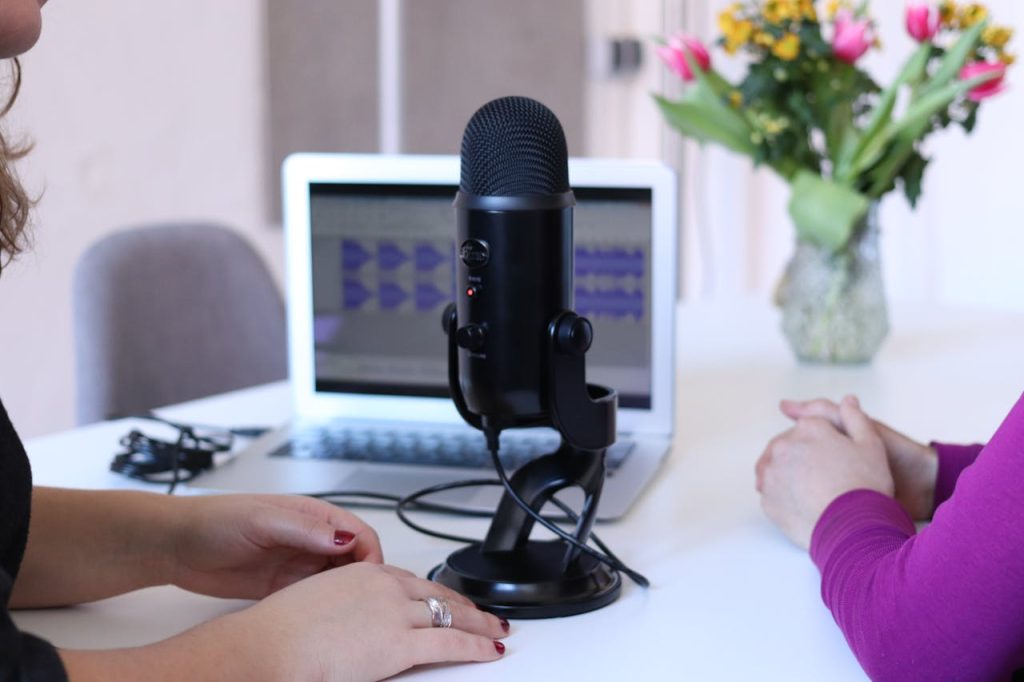
A great alternative for anyone who does not want / like to wear headsets. With lots of variations and styles to suit any budget. Like boom headsets the wired versions will usually perform better than the wireless versions.
These microphones are generally better than a boom headset and offer different patterns depending upon application. For picking up a single voice cardioid, omni-directional are best or one with switchable patterns such as the excellent Blue Yeti, although is expensive is worth every penny.
Desktop microphones are a brilliant option for hearing aid users, but the downside is that they do take up desk space and need to be positioned in front of your mouth. Watch out for connectivity, most use USB so just check that the type of USB used and if needs be a USB~USB converter may need to be used.
Blue Yeti, Shure, Rode, Logitech and Speechware are all great wired desktop microphones but do expect to pay a more, typically £100 upwards and more for wireless versions.
Desktop microphones
Lavaliere (lapel) microphones
Lavaliere (lapel) microphones
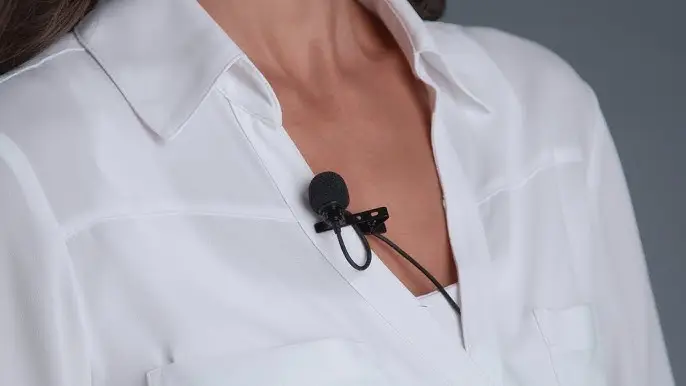
Another great option is a lavaliere or more commonly know lapel microphone. Especially for those with hearing aids, or just don’t like wearing headsets. Again lots of styles wired and wireless versions to suit all budgets.
These microphones are generally as good as boom headsets but you do need to take care in making sure the microphone is positioned close to your mouth and that clothing does not drag over teh microphone / get in the way.
Wired lapel microphones can be very cheap, but quality might not be so good. The wireless versions like the excellent RODE versions are really versatile, so can be used for podcasting, interviewing and more, but of course are a little more expensive.
RODE, Holyland, Speechware, and Sennheiser are all great choices, and expect to pay from £50 upwards.
Smartphones
My experience and thoughts on the big three...
With the ever increasing functionality of smartphones they have rightly or wrongly become an everyday essential for most. We use them in every aspect of our lives at work, at home and keeping our social lives on track!
But surprisingly none of them prioritise audio quality for the phone function!
My own experiences have found that all have good and bad qualities for sound, connectivity, etc.

+ Audio call quality
+ Accessible functionality and accessories
– Bluetooth connectivity
Samsung S10 onwards have really good audio reproduction of audio and video calls especially when using the loudspeaker mode. Granted reception and signal strength are key, but overall the Samsung phones do seem to have the best audio quality.
All smartphones these days have a bewildering array of features and accessories, but as Samsung uses Android they are packed full of the latest accessibility functions, just check out the Accessibility settings to tailor the phone to better suit your needs.
I use the Samsung Watch as my alarm clock as it has a strong vibration which has rarely failed to wake me up.
The only weak-point is Bluetooth connectivity, it does not seem to be as strong or robust as the other two big makes. Often causing dropout between phone and accessory, especially when in crowded areas where lots of other Bluetooth devices are being used.
+ Accessible functionality and features
+ Video quality
+ Bluetooth connectivity
– Audio quality for audio/video calls
– Restricted to Apple only ecosystem
For existing Apple users the iPhone is a no-brainer and are excellent products.
Apple have recently puts lots of effort in to catch up with Google Android for accessibility features, so much so there are lots of really useful features built-in, again just check out the Accessibility settings to tailor the phone better to your needs.
A lot of accessory manufacturers are taking up on Apple’s ‘Made for … ‘ so are developing some excellent Bluetooth integrated accessories that work really well with Apple devices. I highly suspect hearing aid manufacturers to develop more of their aids as being ‘Made for …’.
An interesting area to watch is, Apple are making slow but steady inroads to the hearing aid marketplace in the US, so it wouldn’t surprise me if we soon see an Apple hearing aid type device.
+ Great audio quality on audio/video calls
+ All the latest Android accessible features
+ Some later Pixel phones come with built-in live transcription for calls
– Focussing away from developing further accessibility features, in favour of AI driven features
The lesser popular of the big three, but still teh Pixel range are excellent smartphones.
Being a Google developed phone they come with all teh latest Android features. Check out the Accessibility settings.
Some of the later phones come with live transcription for audio calls, however, the transcription accuracy does not seem that good, even if the reception and signal strength are good.
The latest developments from Google / Android do seem to be taking a new direction integrating more Artificial Intelligence (AI) into non-accessible features.
In-ear headphones
Apple Airpod Pro 2 & 3
Apple Airpod Pro 2 & 3
Voice recorder & AI Transcriber
PLAUD NOTE

PLAUD NOTE
With the purchase of the device you get limited free transcriptions, so to be really useable it needs one of their subscriptions.
Other tips and tricks
Get organised
KEEP CALM
AND GET
ORGANISED
Get organised
I’ve found living with hearing loss is extra draining from the concentration and effort needed to get things done.
By getting organised, both in work and at home has really helped by just making things that little bit easier. It’s all about finding the right method that you can use and stick to, admittedly it has taken me a few iterations to find my ideal ways to stay organised.
Here are a few tips and tricks…
Kanban boards
Kanban boards
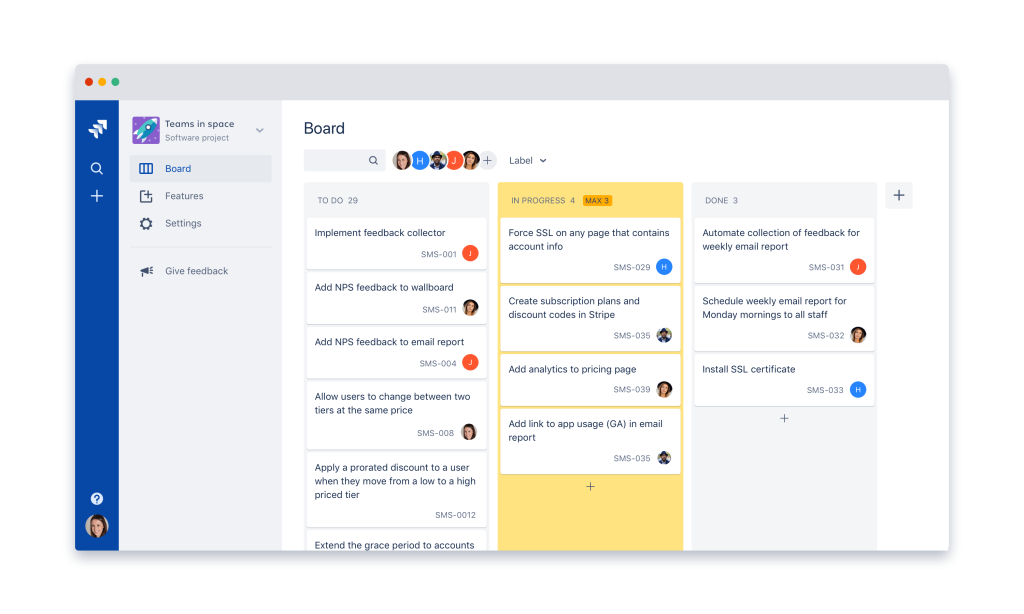
My favourite to do type lists, so much so my whole life is organised on them, sad I know, but they are a fantastic tool!
Think of them as an advanced to do list / pad and pen. Create tasks and collect associated tasks together as one project. It might be ‘Paint the front room’, so you’ll have seperate tasks in this project like choose colour, buy the paint, sand down the walls and woodwork, etc. Tick off each task until you have completed the project.
Many have various options like sub-tasks, notes, setting deadlines, assigning to a team member, reminders and categories.
There are lots of free/fremium/subscription kanban boards but they all do the same. Personally, I use TasksBoards as this connects seamlessly with my main Google calendar.
Pad and pen

Pad and pen
Lots of people prefer the good old trusty pad and pen, there is nothing wrong with that. But there are ways you can use them to greater effect.
How about using the back pages in the pad to jot all your ideas, thoughts and random ‘I must remember to do that’. Then one a new page at the front create the project and copy and organise the relevant tasks under it each specific project.
How about having sperate pads, made one for work, home, college etc.
The only potential downside is that to be fully effective the pad(s) need to be with you at all times.
DECLUTTER
YOUR MIND
MIND DUMP IT!
Mind (or Brain) dump
We are constantly thinking about so much these days, food shopping, the kids, work stuff and lots more, which all takes up valuable space in our minds.
A fantastic tool is to declutter your mind and get everything wrote down / on a to do list or Kanban board. The aim is to get it out of your mind so that you can think with greater clarity on whatever you are doing. You’ll be more efficient, less stressed and distracted.
Often many people turn mind dumps into mind maps that visualises their thoughts, tasks and ideas.

Eat that frog
Ok, sounds a bit silly but it is a brilliant concept that helps to get the tasks you have to do done. Go check out the ‘ribbit’ing (sorry) book by Brain Tracy it really does make sense.
Very simply, do the most difficult, most put off task first, it is as simple as that! What this does is gives a sense of achievement and accomplishment.
‘Oh, that feels good, I’ve done that task I was forever putting off’
A brilliant way of starting each day, project or whatever you need to etc done at home, work, college or university.

Notion
For the more techy, Notion is a fantastic and versatile tool. You can create Kanban boards, to do lists, calendars, mind dumps and a whole heap more.
I’ve even created full customer relations mangers (CRMs) and various other databases using Notion. Along with a store for all my recipes – lunch, dinner, snacks and cakes.
However, it does take a bit of getting used to simple programming and protocols, but nothing as difficult as quantum physics!
There are other database alternatives out there, even Microsoft has launched the new 365 app Loop, a Notion-like database solution.
Anything missing, or need more help, do get in touch?
Always happy to have a discuss any challenges that you may have that you think we could be of help.
- Connect with David
- +44 (0)1706 618002